

Cookie attributes explained: SameSite, Secure, HttpOnly and CHIPS
A stored login cookie is missing from a cross-site request. A request made with fetch has no session. An embedded widget remembers a visitor on one website but starts fresh on another. These symptoms can come from different rules.
Secure, HttpOnly, SameSite, Partitioned and the __Host- prefix address different boundaries. Adding them without understanding those boundaries can break a flow without making it safe. Start with what each setting controls, then test the actual requests your application makes.
Japanese original published: 2026-06-17
Secure restricts the transport
A Secure cookie is normally sent only over HTTPS. Use this restriction for login-session cookies so they are not attached to ordinary HTTP requests.
Set-Cookie: session=abc123; SecureSecure does not protect the value from every other threat. It does not prevent JavaScript from reading the cookie, fix session-management bugs, or stop requests triggered by an XSS attack. It is not a guarantee about storage on disk or browser extensions. Some browsers treat localhost specially; success on a local HTTP development server does not establish that the same cookie will work on a public HTTP site.
HttpOnly blocks script access, not authenticated requests
HttpOnly prevents access through document.cookie and other non-HTTP cookie APIs. This reduces the chance that an injected script can directly steal the session value.
Set-Cookie: session=abc123; Secure; HttpOnlyThe browser can still attach that cookie to requests initiated by JavaScript. An XSS payload may be able to act through the victim’s session without reading its identifier.
That does not mean every fetch sends cookies. Its default credentials mode is same-origin. A request to another origin normally needs credentials: "include" to include cookies, and that option does not override SameSite or third-party-cookie restrictions. Continue to address XSS through context-appropriate output escaping, safe HTML handling and a suitable Content Security Policy; cookie attributes are only one layer.
SameSite narrows cross-site requests
SameSite controls whether a cookie is eligible for a cross-site request. It can reduce CSRF exposure, but it neither authorizes an operation nor replaces the server’s defenses.
Scroll horizontally if the table does not fit.
| Value | Broad behavior | Flow to check |
|---|---|---|
| Strict | Send in same-site contexts. | A normal link from another site omits the cookie on the initial request. |
| Lax | Also allow cross-site top-level navigation using a safe method, such as GET. | Check redirects and links, as well as POST callbacks. |
| None | No SameSite restriction; Secure is required. | Other cookie restrictions still apply, including browser policy. |
Explicit Lax does not attach the cookie to a cross-site iframe request, fetch, or ordinary POST form submission. Omitting SameSite is not an interchangeable test case: some browsers allow recently created cookies on top-level POST requests as a compatibility measure, for example within two minutes of creation.
Do not treat None as an override for third-party-cookie blocking. Likewise, Lax cannot protect an application that changes state through allowed GET requests. Requests from an untrusted sibling subdomain may still be same-site. Keep appropriate CSRF tokens, Origin or Referer validation, Fetch Metadata checks and reauthentication where your application needs them.
A site is not an origin
An origin combines scheme, host and port. A schemeful site is based on the scheme and registrable domain. For ordinary top-level documents, consider these pairs:
Scroll horizontally if the table does not fit.
| URLs | Origin | Site |
|---|---|---|
| https://app.example.com and https://api.example.com | Different | Same |
| https://example.com and http://example.com | Different | Different schemes mean different sites. |
An iframe’s ancestor documents also affect its same-site context, so comparing two hostnames is not enough for every embedded request. Ports distinguish origins, but cookies themselves are not isolated by port.
Cookie attachment, permission to read a cross-origin response, and access to another document’s DOM follow different rules. For a credentialed CORS response, Access-Control-Allow-Origin must identify the requesting origin rather than use a wildcard, and Access-Control-Allow-Credentials must be true. A CORS read failure is not proof that no request was sent or processed.
CHIPS separates state by the top-level site
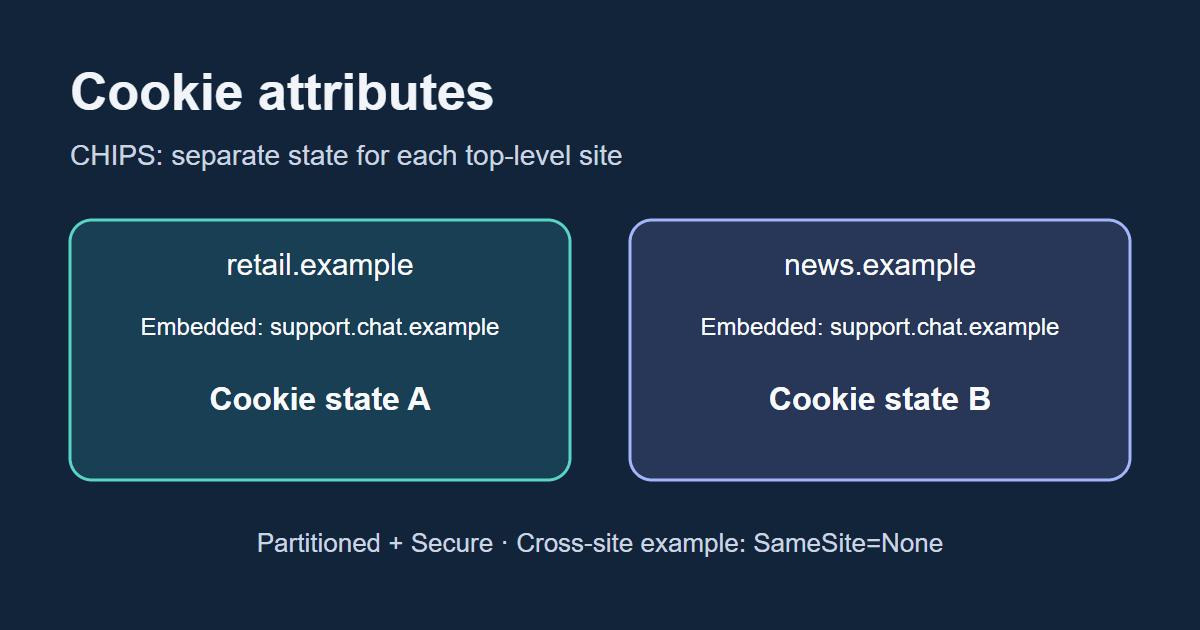
CHIPS stands for Cookies Having Independent Partitioned State. Its Partitioned attribute adds a top-level-site partition to cookie storage while retaining the cookie’s host or domain scope. The partition’s site includes the scheme.
Set-Cookie: __Host-chat=value; Secure; Path=/; SameSite=None; PartitionedSecure is required for Partitioned. This cross-site embedding example also uses SameSite=None: partitioning does not turn off SameSite checks.
Suppose support.chat.example sets the cookie while embedded in retail.example. When that chat service is embedded in news.example, it does not receive retail.example’s partitioned cookie. Returning to the retail site can use that site’s separate state again.
This can suit an embedded chat or another component that needs per-site state. It does not preserve one shared login across unrelated sites. In an environment that does not support Partitioned, the attribute may be ignored and the cookie may behave as an ordinary unpartitioned cookie if policy permits. Test your supported browsers rather than assuming the text of the header guarantees separation.
Moving a token to localStorage does not remove the risks
localStorage values are readable by JavaScript. If an attacker executes script in the application’s origin, a token stored there may be stolen directly.
An HttpOnly cookie prevents that direct read, but eligible requests still carry it. CSRF and XSS-driven requests therefore need separate defenses. The two storage choices expose different attack surfaces; neither makes session design unnecessary.
Consider token lifetime, rotation, server-side revocation, logout, reauthentication and authorization together. A storage location alone does not determine whether a session is secure.
Choose attributes for the actual login or embedding flow
This is a starting shape for a host-only session used by the server:
Set-Cookie: __Host-session=...; Path=/; Secure; HttpOnly; SameSite=LaxUsing an external identity provider or payment service does not automatically require None. Check whether the return journey is a top-level GET, a POST callback or an iframe. Those are different cases when choosing Strict, Lax or None.
For a widget with state that its own JavaScript reads, a partitioned cookie might instead look like this:
Set-Cookie: __Host-widget=...; Path=/; Secure; SameSite=None; PartitionedHttpOnly is deliberately absent from the widget example because script access is part of that example’s requirement. Add it for a session value used only by the server. The ellipses are placeholders, not real secrets.
These headers illustrate attributes, not a complete authentication system. Verify browser support, cookie blocking, CORS, iframe constraints, any Storage Access API integration and the server’s authorization rules.
Match the attribute to the boundary
Secure restricts transport. HttpOnly restricts script access to the cookie. SameSite limits cross-site attachment. Partitioned separates state by top-level site in supporting environments. __Host- constrains the cookie’s scope.
None of these settings covers every threat. HttpOnly does not stop CSRF; Secure does not stop XSS; SameSite does not authorize an operation. When debugging, inspect both the stored cookie and the actual request, then check server-side CSRF, XSS and session defenses separately.
References and sources
- WHATWG Fetch — Credentials mode and CORS ↗
- RFC 6265 — Cookie domain, path and port boundaries ↗
- MDN Web Docs — Set-Cookie header ↗
- IETF HTTPbis — Cookies, Internet-Draft 22 (not a final RFC) ↗
- Chrome Privacy Sandbox — Cookies Having Independent Partitioned State ↗
- OWASP — Cross-Site Request Forgery Prevention Cheat Sheet ↗
Editorial note
This article was prepared with AI assistance and reviewed by an editor before publication. It may still contain factual errors, interpretation mistakes, or outdated information. Check the cited primary sources or official documentation before making an important decision.