

Cron Expressions Explained: Five Fields, Dialects, and Time Zones
* * * * *: five fields that describe when a task should run. The format has been used for decades, but the same expression does not necessarily mean the same thing in every scheduler. This guide distinguishes the basic five-field format from Cronie-style extensions and explains what to check before deploying a schedule.
Japanese original published: 2026-05-11
What cron does
cron is a time-based job scheduler daemon on UNIX-like systems. A conventional cron service runs in the background and checks schedules at minute granularity. When an entry matches, it starts the associated command as a child process. Standard output and standard error can be mailed or logged, depending on configuration.
The idea also appears in modern infrastructure:
- Kubernetes CronJob: creates Jobs that run Pods on a cron schedule.
- GitHub Actions: uses the
scheduleevent to trigger workflows. - AWS EventBridge Scheduler: evaluates cron expressions in a managed scheduling service.
- systemd timers: provide an alternative with their own
OnCalendarsyntax. Converting cron entries requires separate tooling, such as systemd-cron.
Sharing the cron concept does not imply sharing every syntax rule or execution guarantee. Check the specific service you intend to use.
Five time fields are not a complete crontab entry
POSIX defines five date-and-time fields—minute, hour, day of month, month, and day of week—followed by a command. There is no seconds field in that format. Implementations in the Vixie Cron family add features such as environment assignments and extended notation; Cronie's current documentation describes one such implementation.
A cron expression is the scheduling part, not the entire command line. A user crontab contains the five time fields followed by the command. A Cronie system crontab additionally requires a user name between the time fields and the command. Tables below show the time fields only. Examples that include commands are for a user crontab.
# User crontab: five time fields followed by a command
0 9 * * 1-5 /home/user/scripts/report.sh
Replace example paths with files available to the account running the job. A bare five-field expression is not enough to install a working command in crontab.
Field ranges and common operators
The following diagram includes Cronie-style extensions. POSIX limits the weekday field to 0–6 and does not define slash steps or month and weekday names in its basic grammar.
minute  hour  day-of-month  month  day-of-week
0–59    0–23  1–31          1–12   0–7 in Cronie
   *       *       *           *       *
Scroll horizontally if the table does not fit.
| Field | Range | Notes |
|---|---|---|
| Minute | 0–59 | Minute within an hour |
| Hour | 0–23 | 24-hour clock |
| Day of month | 1–31 | A nonexistent date cannot match this condition; weekday OR matching still matters |
| Month | 1–12 | JAN–DEC is an implementation extension |
| Day of week | 0–7 in Cronie | 0 and 7 are Sunday; 1 is Monday, 6 is Saturday |
Scroll horizontally if the table does not fit.
| Operator | Meaning | Example |
|---|---|---|
* | Every value in the field | * * * * *: every minute |
, | List | 1,15 in the day field: the 1st and 15th |
- | Inclusive range | 1-5 in the weekday field: Monday–Friday |
/ | Step within a field | */15 in the minute field: 0, 15, 30, 45 |
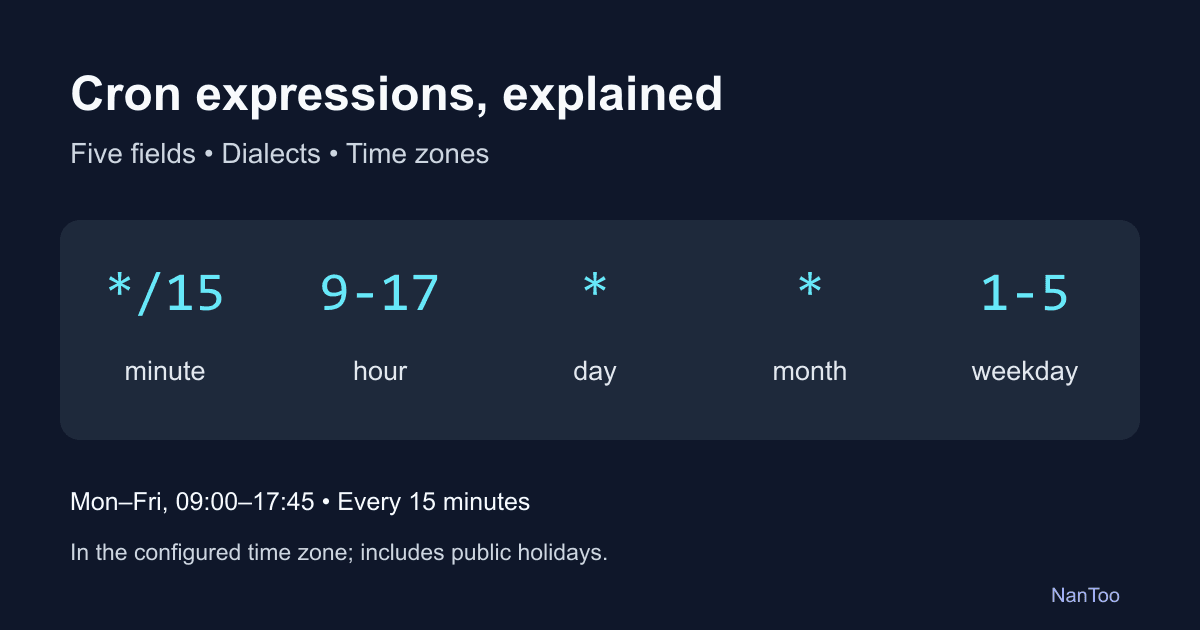
0 9 * * 1-5 means 09:00 Monday–Friday; it does not exclude public holidays. 30 4 * * 0 means Sunday at 04:30. 0 */2 * * * selects 00:00, 02:00, 04:00, and so on in the configured time zone. 0 0 1,15 * * selects midnight on the 1st and 15th of each month.
Common five-field schedules
These are scheduling expressions for a Cronie-style five-field parser. Add a command when using a user crontab, and check the target scheduler's supported syntax.
Scroll horizontally if the table does not fit.
| Schedule | Expression |
|---|---|
| Every minute | * * * * * |
| Every five minutes | */5 * * * * |
| Every ten minutes | */10 * * * * |
| Every fifteen minutes | */15 * * * * |
| At minutes 0 and 30 | 0,30 * * * * |
| On the hour | 0 * * * * |
| Daily at midnight | 0 0 * * * |
| Daily at 09:00 | 0 9 * * * |
| Daily at 02:00 | 0 2 * * * |
| Monday–Friday, hourly from 09:00 through 18:00 | 0 9-18 * * 1-5 |
| Monday at 09:00 | 0 9 * * 1 |
| Sunday at 03:00 | 0 3 * * 0 |
| Monthly on the 1st at midnight | 0 0 1 * * |
| On the 1st and 15th at 09:00 | 0 9 1,15 * * |
| First day of January, April, July, and October | 0 0 1 1,4,7,10 * |
| January 1 at midnight | 0 0 1 1 * |
| Monday–Friday at noon | 0 12 * * 1-5 |
The 1st and 15th are twice a month, not every fourteen days. Monday–Friday schedules include holidays. A daily 02:00 backup also needs a time-zone and DST policy.
Basic five-field cron has no last-day-of-month operator. 0 0 28-31 * * matches every existing date from the 28th through the 31st. Use a command-side calendar check, or a documented extension such as EventBridge Scheduler's L.
Shortcuts, six fields, and seven fields
Common Cronie-style shortcuts replace the time fields:
Scroll horizontally if the table does not fit.
| Shortcut | Equivalent schedule |
|---|---|
@yearly | 0 0 1 1 * |
@monthly | 0 0 1 * * |
@weekly | 0 0 * * 0 |
@daily | 0 0 * * * |
@hourly | 0 * * * * |
@reboot | Once after system startup; normally not repeated by a Cronie service restart |
Cronie uses a lock file to avoid repeating startup jobs. Do not use @reboot as a service-restart hook, and check the startup conditions when moving to another cron implementation.
Spring adds seconds at the beginning. Quartz uses six mandatory fields and an optional year. EventBridge Scheduler's six fields add a year, not seconds.
# Spring: second minute hour day month weekday
0 0 9 * * MON-FRI

# Quartz: second minute hour day month weekday year
0 0 9 ? * MON-FRI 2026
Scroll horizontally if the table does not fit.
| Scheduler | Fields | Seconds / year | Extensions to check |
|---|---|---|---|
| POSIX cron | 5 | Neither | Basic grammar |
| Cronie | 5 | Neither | Steps and @ shortcuts |
| GitHub Actions | 5 | Neither | Steps; no @ shortcuts |
| Kubernetes CronJob | 5 | Neither | Steps, macros such as @monthly; ? means * |
| Spring | 6 | Seconds only | L, W, #, ? |
| Quartz | 6–7 | Seconds; optional year | L, W, #, ? |
| EventBridge Scheduler | 6 | Year only | ?, L, W, # |
EventBridge Scheduler uses minute hour day month weekday year. Its ? means no specific value and is used in either the day-of-month or weekday field. Sunday is 1 in Quartz and EventBridge Scheduler, whereas POSIX uses 0 and Cronie accepts both 0 and 7. Do not transfer weekday numbers between dialects without checking them.
Day of month and weekday: the OR trap
In Vixie/Cronie-style matching, when neither day field starts with *, a match in either field is sufficient. If either starts with *, including */n, both field conditions must match.
# Intended: Friday the 13th at 09:00
0 9 13 * 5

# Actual: every 13th OR every Friday at 09:00
In January 2025 this includes Monday the 13th as well as Fridays the 3rd, 10th, 17th, 24th, and 31st. Even 1-31 and * can behave differently when combined with a restricted weekday, although they select the same day numbers in isolation.
For Friday the 13th, one approach is to schedule every 13th and check the weekday in the command. Keep the schedule's time zone and the command's time zone aligned.
# User crontab: run the command only if the 13th is Friday
0 9 13 * * [ "$(date +\%u)" = "5" ] && /path/to/script.sh
date +%u gives Monday as 1 and Friday as 5. In a crontab command field, a percent sign must be escaped with a backslash even inside shell quotes. If you move the command into a separate shell script, remove that cron-specific escape.
Time zones and daylight saving time
A traditional cron daemon normally uses the system's local time zone. A schedule meant for one region can therefore run at the wrong time on a server configured for another region.
A clock change creates missing or repeated local times. For example, a jump from 02:00 to 03:00 removes 02:30; a move from 03:00 back to 02:00 repeats it. Transition hours differ by region. These are wall-clock examples, not universal rules for whether a job runs.
- Cronie: cron(8) documents special handling for clock changes under three hours for fixed-time and less-than-hourly jobs, including running missed jobs after a forward change and suppressing repeats after a backward change.
- EventBridge Scheduler: skips an invocation at a nonexistent spring-forward time and runs only once at a repeated fall-back time.
- GitHub Actions with timezone: moves a schedule in the skipped spring-forward hour to the next valid time.
Check the implementation, version, and actual target zone. Avoiding “02:00–03:00” is not a universal DST solution.
Per-job zones set with CRON_TZ: Cronie's implementation also documents a limitation: jobs can be missed or run twice during a DST transition in the job's own zone. Do not assume that corrections for the daemon's default time zone apply unchanged to another zone.
# Cronie: a Tokyo schedule with the command using the same zone
CRON_TZ=Asia/Tokyo
TZ=Asia/Tokyo
0 9 * * * /path/to/job.sh

# Alternative: a UTC schedule and UTC command environment
CRON_TZ=UTC
TZ=UTC
0 0 * * * /path/to/midnight-utc-job.sh
CRON_TZ sets schedule interpretation in implementations that support it. TZ aligns commands such as date with that zone. Do not assume every Vixie-derived cron supports CRON_TZ. For Kubernetes, use .spec.timeZone, not an environment assignment inside the schedule string.
UTC avoids DST for a UTC-based schedule, but a fixed UTC hour does not preserve the same local hour year-round in a region with DST. Choose the zone that matches the business requirement.
Japan currently has no DST. For a job at 09:00 Japan Standard Time (UTC+9), 0 0 * * * works when interpreted in UTC. GitHub Actions defaults to UTC and also supports an IANA timezone setting. Its shortest schedule interval is five minutes, and heavy load can delay or drop scheduled runs.
The command environment: paths, shells, and output
A command that works in your terminal may fail under cron because cron normally does not load your interactive shell's startup configuration. Cronie sets variables such as HOME and LOGNAME; it does not simply run with an empty environment. PATH depends on the implementation and configuration, and the default command shell is typically /bin/sh.
# Fragile: depends on PATH and the working directory
0 9 * * * python script.py

# Use paths that exist for the job's account
0 9 * * * /usr/bin/python3 /home/user/scripts/script.py
You can also declare the required environment explicitly:
PATH=/usr/local/bin:/usr/bin:/bin
SHELL=/bin/bash
0 9 * * * python3 /home/user/scripts/script.py
Mail requires a working mail delivery setup. MAILTO controls where output is sent; it is not a monitor of the exit status alone. A silently failing job can produce no mail.
# Choose one setting; it applies to subsequent entries
MAILTO=""
# Alternatively, send job output to this address
MAILTO=admin@example.com
If both assignments are used in that order, the second value applies to jobs that follow them. An empty value suppresses output mail.
# Append stdout and stderr to a writable log file
0 2 * * * /path/to/backup.sh >> /var/log/backup.log 2>&1

# Discard both streams; useful diagnostic output is lost
0 * * * * /path/to/job.sh > /dev/null 2>&1
Check permissions and log rotation. Depending on the system, inspect /var/log/syslog or use journalctl -u cron; the service may instead be named crond. Use crontab -l to inspect installed user entries. A daemon log showing a launch is not proof that the command succeeded.
Managed schedulers change operations, not the need for checks
Scroll horizontally if the table does not fit.
| Service | Schedule format | Typical integration |
|---|---|---|
| AWS EventBridge Scheduler | Six fields, including year | Managed target invocation, retries, dead-letter queues |
| Google Cloud Scheduler | Five-field unix-cron | HTTP, Pub/Sub, App Engine |
| GitHub Actions schedule | Five fields | CI/CD workflows |
| Kubernetes CronJob | Five fields | Jobs and Pods, concurrency policy |
A managed scheduler can reduce the work of operating a scheduling server, but it cannot eliminate failures in the target, permissions, or network. Configure and check monitoring, retry rules, concurrency limits, quotas, cost, and log retention for the service you use.
Even Kubernetes documents circumstances in which a CronJob can create two Jobs or none. A cron expression does not promise exactly one successful execution. Make jobs idempotent where possible: repeating an operation should not corrupt the result or duplicate an external effect.
A local cron daemon can still be appropriate for small single-server tasks such as cleanup or log maintenance, particularly when reducing dependencies and setup work matters.
Five common scheduling mistakes
1. Every minute instead of every day
* * * * *   # Every minute (expression only)
0 0 * * *   # Daily at midnight (expression only)
Each star accepts every value in that field. To select one minute of a day, restrict both minute and hour.
2. Assuming Sunday always has the same number
Use 0 for Sunday in POSIX-style five-field schedules. Cronie also accepts 7; Quartz and EventBridge Scheduler use 1. Verify the dialect rather than applying one rule everywhere.
3. Combining the first seven days with Monday
# Wrong for "first Monday": days 1–7 OR every Monday
0 9 1-7 * 1

# User crontab: check Monday inside the command
0 9 1-7 * * [ "$(date +\%u)" = "1" ] && /path/to/script.sh
The command-side check assumes the same time zone as the schedule.
4. Treating steps as an elapsed-time interval
*/30 9-17 * * * includes 17:30. To stop at 17:00, use two schedules:
0,30 9-16 * * *
0 17 * * *
*/35 * * * * selects minute 0 and minute 35 of each hour. The gap from 09:35 to 10:00 is only 25 minutes. Likewise, */2 in the day field starts at the 1st of each month; it does not mean a continuous 48-hour interval.
5. Using the 31st as the last day of every month
0 0 31 * * misses February, April, June, September, and November. A range of 28–31 runs on several dates. Here is a command-side last-day check with explicit assumptions:
# Cronie with GNU date; both schedule and command use UTC
CRON_TZ=UTC
TZ=UTC
0 0 28-31 * * [ "$(date -d tomorrow +\%d)" = "01" ] && /path/to/script.sh
This runs at the start of the last UTC day of the month. GNU date's -d syntax is not portable to the default BSD/macOS date command. The UTC condition also avoids local DST complications in this example. A local business-calendar requirement needs its own zone-aware validation.
Maintain the schedule and verify its execution
Keep a reviewed copy of the crontab
crontab -l > crontab.txt
# Confirm that export succeeded; inspect entries and secrets before committing
git add crontab.txt
git commit -m "Document scheduled jobs"

# Review first: this replaces the current user's entire crontab
crontab crontab.txt
Add comments explaining ownership and purpose:
# [2026-01-15] Database backup; owner: Operations
0 2 * * * /opt/scripts/db-backup.sh >> /var/log/db-backup.log 2>&1

# [2026-03-01] Daily report; owner: Reporting
0 8 * * 1-5 /opt/scripts/daily-report.sh >> /var/log/report.log 2>&1
Choose output destinations, notification rules, and retention periods. Ensure the job's account can write the selected logs.
Prevent overlap where it matters
# Linux util-linux flock: skip if another run holds this lock
* * * * * /usr/bin/flock -n /home/user/.local/state/myjob/job.lock /path/to/long-job.sh
Create the parent directory first, owned by the job's account, and adapt the paths. Do not delete or replace the lock file while it is in use. flock -n exits without waiting if it cannot acquire the lock. It coordinates processes sharing that lock while it is held; behavior across hosts and filesystems needs separate verification.
Detect missing runs
Send a completion signal to an external monitor and alert when an expected signal does not arrive. Services such as Healthchecks.io and Cronitor provide job monitoring, or you can implement a monitoring endpoint yourself. Arrange for the signal to represent the completion condition you actually care about.
Use a preview as a check, not an execution guarantee
NanToo's Japanese-language Cron Expression Generator supports a bounded numeric five-field grammar. Its explicit refresh action shows up to five future matches within eight years after the reference time, using browser-local time or UTC. It does not automatically refresh, install jobs, or schedule their execution.
The tool does not accept month or weekday names, @ shortcuts, L/W/#/?, or seconds and year fields. Its preview does not model production-daemon DST corrections or retries. Confirm the final behavior in the scheduler that will actually run the job.
Check the expression, time zone, and runtime together
Five fields make many recurring schedules compact, but portability of the idea is not portability of every detail. Treat the expression, time zone, and execution environment as one configuration.
- Check how day of month and weekday combine.
- Verify field counts, weekday numbers, and extensions when changing schedulers.
- Choose the business time zone and align command-side date checks with it.
- Check paths, shell behavior, permissions, and output handling.
- Compare previewed times with the production scheduler's documented behavior.
- Plan logging, overlap control, retries, and missing-run monitoring.
These checks make a short cron expression easier to operate reliably, without assuming that a matching time guarantees a successful job.
References and sources
- Cronie implementation: startup and per-job time zones ↗
- Google Cloud Scheduler: cron format ↗
- POSIX crontab ↗
- Cronie crontab(5) ↗
- Cronie cron(8): clock changes ↗
- GitHub Actions: schedule ↗
- Kubernetes CronJob ↗
- EventBridge Scheduler schedule types ↗
- Spring scheduling ↗
- Quartz CronTrigger ↗
- GNU date: relative items ↗
- util-linux flock ↗
Editorial note
This article was prepared with AI assistance and reviewed by an editor before publication. It may still contain factual errors, interpretation mistakes, or outdated information. Check the cited primary sources or official documentation before making an important decision.