

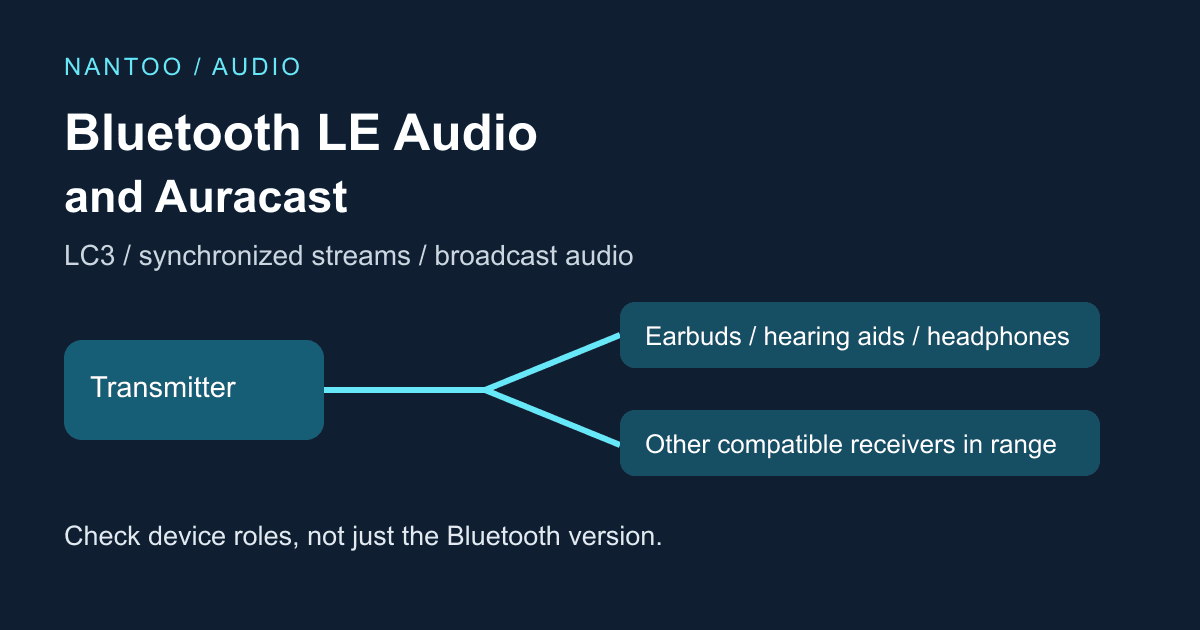
Bluetooth LE Audio and Auracast explained: LC3, broadcasts and hearing aids
For many people, Bluetooth audio has meant pairing a phone with a set of headphones. Sharing television audio with family, receiving airport announcements through personal earbuds or delivering a talk to hearing aids has been harder to provide consistently across manufacturers.
Bluetooth LE Audio and Auracast broadcast audio broaden those possibilities. The change covers a Bluetooth Low Energy audio architecture, the LC3 codec, synchronized streams and one-to-many broadcasting. It is much more than a claim of slightly better sound.
Japanese original published: 2026-06-30
Classic Audio and LE Audio: what changes?
A Bluetooth version number and an audio capability describe different things. For high-quality music and other audio distribution, Bluetooth Classic commonly uses A2DP, which requires support for SBC. Optional codecs need support at both ends. Calls use other profiles, such as HFP, so A2DP and SBC do not describe all of Classic Audio.
Classic Audio uses the Bluetooth Classic radio; LE Audio uses the Bluetooth Low Energy radio.
Scroll horizontally if the table does not fit.
| Aspect | Classic Audio | LE Audio |
|---|---|---|
| Radio | Bluetooth Classic | Bluetooth Low Energy |
| Codec requirements | SBC is mandatory for A2DP; calls use a different profile | LC3 is the mandatory baseline codec; additional codecs are possible |
| Typical uses | Connected audio streaming and calls; support for multiple devices depends on the product | Synchronized streams, broadcast audio and hearing-aid support |
| Examples of specifications and features | A2DP and AVRCP | Multi-Stream Audio and Auracast |
Sources: Bluetooth SIG: LE Audio / Bluetooth SIG: Advanced Audio Distribution Profile 1.4.1 / Bluetooth SIG: Bluetooth LE Audio FAQs. Table organized by the editorial team.
LE Audio establishes a set of audio specifications for Bluetooth LE. That broader architecture, rather than a small improvement in compression alone, makes it possible to standardize experiences such as shared broadcasts and hearing assistance.
LC3 provides more design choices
The baseline codec is LC3. Its specification is formally titled Low Complexity Communication Codec; introductory material also uses the plural Communications. LC3 support is mandatory, but additional codecs are allowed.
This does not mean LC3 gives the best quality for every source at any given bitrate. Its usefulness is the ability to target practical quality at low data rates, giving product designers more choices:
- Allocate more bitrate when sound quality is the priority.
- Reduce transmitted data when energy use is the priority.
- Work within the power and size constraints of earbuds and hearing aids.
- Balance quality and reliability for the intended application and radio environment.
Bluetooth SIG presents LC3 as a way to give designers flexibility in balancing quality and power consumption. It is a building block, not a guarantee of excellent sound. Battery life also depends on radio operation, processing, amplification and usage: a percentage reduction in bitrate does not translate directly into the same percentage improvement in battery life.
LC3 is distinct from LC3plus and vendor-specific codecs. A product advertising Bluetooth 6.0 does not, by that fact alone, provide LC3plus as a standard feature.
Multi-Stream Audio and separate earbuds
Some earlier true wireless earbuds sent audio from a phone to one earbud, which then relayed it to the other. Implementations vary, but coordinating left and right playback, using one earbud, handling dropouts and changing sources can be complicated.
Multi-Stream Audio supports multiple independent, synchronized streams between a source and one or more receiving devices. This gives designers a standards-based foundation for separate left and right streams, single-earbud operation and coordinated receivers, including hearing aids. It can also help improve the experience of moving between sources such as a phone, computer or television.
Multi-Stream is not synonymous with multipoint, which maintains connections to multiple sources. Support for synchronized streams does not by itself guarantee simultaneous playback from two sources or automatic source switching. Products do not all implement the same experience: the source, receivers, operating system, applications and firmware must support the required combination.
Auracast: choosing a broadcast
Auracast broadcast audio builds on LE Audio broadcasting, with interoperability requirements involving the Public Broadcast Profile (PBP) and related specifications. Auracast is also a Bluetooth SIG trademark. An arbitrary LE Audio broadcast is not automatically an Auracast broadcast.
The familiar Classic Audio experience starts by connecting a particular phone and headset. Auracast offers a listening experience closer to tuning into a broadcast. A compatible receiver can use an assistant, such as a phone, to discover a nearby broadcast and select it. The assistant supplies information needed to join; audio normally travels directly from the transmitter to the receiver. The phone is not thereby acting as an audio relay.
Typical connected audio:
  phone <-> earbuds
  pairing between the devices

Auracast audio path:
  airport gate / TV / theater transmitter
      -> earbuds
      -> hearing aids
      -> headphones
      -> other listeners within range
This is a conceptual audio-path diagram. Receivers do not individually pair with the broadcast transmitter. A control connection between an assistant and earbuds may still require pairing. Adding listeners does not require a separate audio connection for each receiver, but range, dropouts and the number of transmitted streams remain subject to hardware and radio conditions.
Sources: Bluetooth SIG: How it works / Bluetooth SIG: How to build an Auracast™ transmitter. Conceptual diagram organized by the editorial team.
Examples include muted televisions at gyms, airport announcements, theaters, lectures and museum audio guides: places where people can see what is happening but cannot easily hear the relevant audio.
Auracast is local Bluetooth broadcasting. It is not an internet distribution service like a livestream or a podcast, and does not deliver a broadcast to listeners around the world.
Why hearing-aid support matters
Sharing music with friends is only one use case. Accessibility for people who use hearing aids or cochlear implants is another important part of LE Audio and Auracast.
In theaters, classrooms, meeting rooms and other public spaces, loudspeaker audio can be difficult to follow because of reverberation and surrounding noise. Sending audio to a compatible hearing aid or earbud can reduce the effect of the acoustic path between a loudspeaker and the listener. The benefit varies by person and situation; clear speech in every environment is not guaranteed.
Induction loops and dedicated receivers already provide assistive listening. Deployment, receiver availability and compatibility all matter. Auracast offers a shared standard in which consumer phones, earbuds and hearing aids can participate, but a standard alone does not make a venue accessible.
A useful installation needs transmitters, compatible receivers, clear instructions and appropriate privacy arrangements. Existing hearing aids and cochlear-implant sound processors do not automatically become compatible: check the model, updates and supported accessories. Venues should retain ways their visitors can actually use, including existing assistive-listening systems where needed.
Check device roles, not just the version number
A product marked Bluetooth 5.3 does not necessarily support LE Audio or Auracast. Look for explicit features and roles:
Scroll horizontally if the table does not fit.
| Label | What to verify |
|---|---|
| LE Audio | Support for the required Bluetooth LE audio features |
| LC3 | Support for the baseline LE Audio codec |
| Auracast transmitter | Whether the TV, phone or other device can broadcast audio |
| Auracast receiver | Whether the earbuds, headphones or hearing aids can receive broadcasts |
| Auracast assistant | Whether the phone or other controller can discover and select broadcasts and help the receiver join |
Sources: Bluetooth SIG: Bluetooth LE Audio FAQs / Bluetooth SIG: Answers to commonly asked questions about Auracast™ broadcast audio / Bluetooth SIG: How it works. Table organized by the editorial team.
Auracast is not mandatory for every LE Audio product. An assistant-capable phone is not necessarily a transmitter. Check the broadcast-selection interface, entry of codes for encrypted broadcasts, and the required operating system and firmware.
Both the broadcast source and the listening device must support the intended setup. Compatible earbuds alone cannot receive an Auracast broadcast from a television or venue that has no Auracast transmitter. A venue's transmitter cannot make incompatible headphones receive it.
Classic Audio-only and LE Audio-only devices cannot exchange audio directly. A product can support both, but the connected devices must use a shared audio approach. LE Audio products are not required to support Classic Audio as well. If you want to keep using your existing headphones or phone, check the audio capabilities of both products.
Bluetooth 5.2 or later is not enough information. Confirm LE Audio, LC3, Auracast broadcast audio and the specific transmitter, receiver or assistant role needed for your use case.
How this relates to Bluetooth 6.0
LE Audio and Auracast did not originate as Bluetooth 6.0 features. One of the notable additions in Bluetooth 6.0 is Channel Sounding, which supports fine-ranging between connected devices. It is relevant to finding devices, digital keys and proximity-based control.
The foundation used by LE Audio, LE Isochronous Channels, was introduced in Bluetooth Core 5.2. It provides a transport for data with defined timing intervals. A Core 5.2-or-later label does not guarantee implementation of that feature or the audio profiles.
LE Audio concerns codecs, synchronized streams, broadcasting and hearing-aid support. Channel Sounding concerns distance measurement. Neither “Bluetooth 6.0 therefore supports Auracast” nor “Auracast is new in Bluetooth 6.0” is a reliable conclusion.
See our Bluetooth 6 and Channel Sounding article for ranging. For audio, examine the audio features and device roles separately from the Core version number.
Security and privacy of broadcasts
A broadcast is intended to let multiple nearby listeners receive audio. That makes it useful for airport announcements, assistive audio in theaters or a gym television. It is also a reason to think carefully before broadcasting private meeting discussions or personal information.
Broadcasts can be open and unencrypted, or encrypted using a Broadcast_Code. A receiver needs the same code to decrypt the audio. Bluetooth signals may pass through walls, so an assumption that only people in the room can listen is not an access restriction. Decide who receives the code and how it is shared.
Possession of a shared code is not individual identity verification, and encryption does not guarantee that a listener cannot record or redistribute the audio. Choose a clear broadcast name and make the intended audience and operating rules understandable.
Auracast transports audio; it does not automatically resolve content rights. Music, films, talks and translated audio may require separate permission or licensing checks.
From completed specifications to usable installations
Bluetooth SIG announced completion of the LE Audio specification set on July 12, 2022. This meant the initial set was ready; it did not mean that revisions and additional capabilities would stop. A new standard can exist for some time before people encounter it in everyday products.
Chips, operating systems, drivers, phones, listening devices, televisions, venue transmitters and selection interfaces must work together in the intended setup. Publication of a specification is only one step.
As checked on November 13, 2026, Bluetooth SIG's Auracast location profiles include deployments at theaters, cinemas and universities. These are examples of adoption, not a measurement of the share of all venues that support Auracast, or evidence that a particular venue you plan to visit provides it. Ask the venue where and how the service can be used.
Products still differ: some provide Classic Audio only; some support LE Audio but have limited Auracast reception features; others cannot transmit. Read each claim in terms of the feature and role it actually describes.
References and sources
- Bluetooth SIG: LE Audio ↗
- Bluetooth SIG: Auracast ↗
- Bluetooth SIG: Specifications and documents ↗
- Bluetooth SIG: Bluetooth® Channel Sounding ↗
- Bluetooth SIG: Advanced Audio Distribution Profile 1.4.1 ↗
- Bluetooth SIG: Bluetooth LE Audio FAQs ↗
- Bluetooth SIG: Low Complexity Communication Codec 1.0.1 ↗
- Bluetooth SIG: Basic Audio Profile 1.0.3 ↗
- Bluetooth SIG: Answers to commonly asked questions about Auracast™ broadcast audio ↗
- Bluetooth SIG: How it works ↗
- Bluetooth SIG: How to build an Auracast™ transmitter ↗(Technical overview, Version 3 (September 16, 2026). See especially Sections 2.1 and 5.)
- Bluetooth SIG: Support for hearing assistance ↗
- Bluetooth SIG: Bluetooth SIG Announces Completion of LE Audio Specifications ↗
- Bluetooth SIG: Auracast™ location profiles ↗
Editorial note
This article was prepared with AI assistance and reviewed by an editor before publication. It may still contain factual errors, interpretation mistakes, or outdated information. Check the cited primary sources or official documentation before making an important decision.