

How USB-C PD Reaches 240 W: Voltage, Current, PPS and EPR
USB-C chargers carry ratings such as 30 W, 65 W, 100 W, 140 W and 240 W. The basic relationship is P = V × I: power equals voltage multiplied by current, measured in watts, volts and amperes respectively. A maximum rating, however, is different from the power actually flowing.
USB Power Delivery (USB PD) negotiates the available voltage and current. Features such as PPS and EPR add adjustable voltages and higher voltage ranges. This article uses USB-IF and semiconductor manufacturers' documentation to explain the numbers, distinguishing EPR introduced with USB PD 3.1 from SPR AVS added in USB PD 3.2.
Japanese original published: 2026-06-06
Higher voltage makes higher power possible
Electrical power is the product of voltage and current:
P [W] = V [V] × I [A]These are representative USB PD voltages paired with current limits. The applications are examples, not power requirements shared by every product.
Scroll horizontally if the table does not fit.
| Voltage × current | Power | Example application |
|---|---|---|
| 5 V × 3 A | 15 W | Phones and small accessories |
| 9 V × 3 A | 27 W | Fast-charging phones |
| 15 V × 3 A | 45 W | Thin laptops |
| 20 V × 5 A | 100 W | High-power SPR charging |
| 28 V × 5 A | 140 W | EPR laptops |
| 36 V × 5 A | 180 W | Larger equipment |
| 48 V × 5 A | 240 W | The EPR maximum |
Specification reference for this table: www.usb.org: USB Charger (USB Power Delivery) | USB-IF. Products of voltage and current, and application examples, are editorial calculations and summaries.
Delivering 240 W at just 5 V would require 48 A. That would impose impractical demands on the cable, connectors and heat dissipation in this context. EPR (Extended Power Range) raises the voltage to 28 V, 36 V or 48 V while keeping the maximum current at 5 A.
SPR and EPR: ceilings of 100 W and 240 W
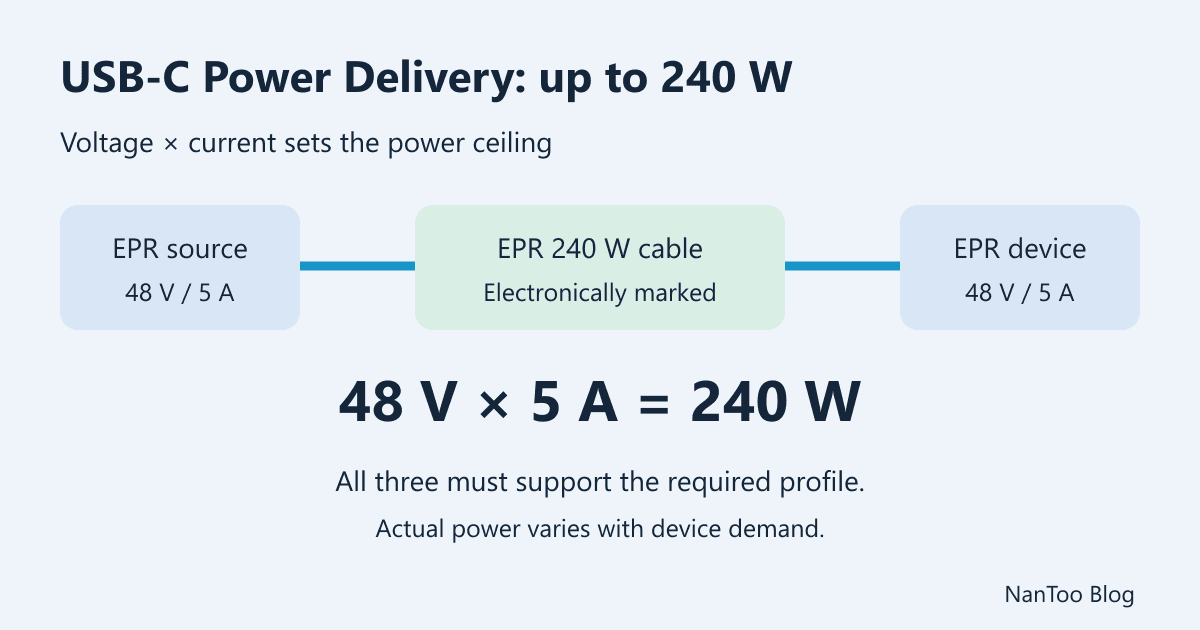
USB PD 3.1 distinguishes SPR (Standard Power Range) from EPR (Extended Power Range), which extends operation to higher voltages. SPR reaches 20 V × 5 A = 100 W; EPR reaches 48 V × 5 A = 240 W. Being in EPR mode does not mean that more than 100 W is flowing at every moment.
A USB-C connector alone does not establish support for 240 W. The required combination must be supported by all three parts:
- Source: the charger offers the required EPR output profile.
- Sink: the device can accept that voltage and current.
- Cable: it supports EPR and identifies its capabilities through an electronic marker.
If the EPR requirements are not met, its higher voltages are unavailable and negotiation uses supported SPR capabilities. That does not guarantee 100 W or 60 W. If a 140 W charger delivers only 60 W, check the cable and device specifications before assuming the charger is at fault.
Why cable current matters: resistive loss follows I²R
For a cable resistance R, power dissipated as heat is I²R. At the same resistance, the loss rises with the square of current:
Loss at 5 A / loss at 3 A = 5² / 3²
= 25 / 9 ≈ 2.78
This means approximately 2.78 times the power loss, not 2.78 times the temperature. Temperature rise also depends on heat dissipation and the surroundings. USB Type-C cables rated for 5 A carry an electronic marker, or e-marker, so that their current capability can be identified.
A 60 W / 3 A cable cannot provide the 100 W or 140 W combinations discussed here. Check the cable's 5 A capability and, for EPR operation, its EPR / 240 W support, as well as the charger's wattage.
Reading 60 W, 100 W and 240 W cable ratings
Similar-looking USB-C cables can have different voltage and current capabilities.
Scroll horizontally if the table does not fit.
| Rating | Typical meaning | What to check |
|---|---|---|
| 60 W | 20 V × 3 A | Insufficient for 100 W charging |
| 100 W | 20 V × 5 A | A legacy 100 W / 5 A rating does not establish EPR support |
| 240 W | EPR operation up to 48 V × 5 A | The source and device must also support the required EPR profile |
Specification reference for this table: Renesas: USB Power Delivery: The Technology 1 - Convenience and Safety. Products of voltage and current, and application examples, are editorial calculations and summaries.
A 100 W or 240 W cable does not force that power into a device. Conversely, a 3 A cable limits the available current even when the source and device support more. What matters is a voltage-and-current combination that all three support; comparing their maximum wattages alone does not establish compatibility.
An e-marker's presence is not, by itself, proof of 5 A or EPR support: check the capabilities it identifies. Charging power and data transfer speed are also separate specifications.
PPS and AVS: what adjustable voltage changes
PPS (Programmable Power Supply) lets a device request fine voltage adjustments from the source. It is commonly associated with smartphone fast charging. Choosing an input suited to the device's charging circuit can reduce conversion losses.
That does not mean a voltage closer to the battery voltage is always more efficient. The conversion circuit, load and cable losses all affect the appropriate input voltage.
AVS (Adjustable Voltage Supply) is another adjustable-voltage mechanism. EPR AVS introduced in USB PD 3.1 starts at 15 V and extends to 28 V, 36 V or 48 V according to source capability. USB PD 3.2 also includes SPR AVS in the 9–20 V range, so AVS is not exclusive to EPR. PPS voltage requests use 20 mV steps, while AVS uses 100 mV steps. These are request resolutions, not guarantees of output-voltage accuracy. Check the source and device's supported ranges rather than relying on the specification name alone.
Wattage alone does not determine charging speed
A 140 W charger does not charge every device at 140 W. Negotiation establishes the usable voltage and current limits. Actual power varies within those limits with the load and charging control. Consider:
- The PDOs and APDOs offered by the charger
- The voltage and current the device can request
- The cable's voltage and current capabilities
- Device control based on temperature and battery charge level
A typical lithium-ion charging sequence can begin with low-current precharge for a deeply discharged battery, followed by constant-current charging and then a constant-voltage stage in which current tapers. An emptier battery does not always accept more power. Temperature can also impose limits. “Up to 100 W” is therefore a ceiling under suitable conditions, not a continuous charging rate.
As explained in the article on mAh and Wh, distinguish energy in Wh from power in W. Cable loss depends on current and resistance. W alone cannot determine charge time: device operation and conversion losses also consume energy.
Multiport chargers: total power is not per-port power
A charger labelled “100 W total” may allocate power differently when two devices are connected: for example, 65 W + 30 W, 45 W + 45 W or 65 W + 20 W. These are illustrative allocations, not universal specification values. Read the product's simultaneous-use output table.
For a laptop and phone used together, check:
- The maximum output of a single USB-C port when used alone
- The allocation to each port during simultaneous use
- Whether connecting a USB-A device reduces USB-C output
- Whether PPS remains available in that combination
- The laptop's input requirements
Some laptops can charge slowly from 45 W. Others can lose battery charge under load with an input below 65 W, or need more than 100 W for their intended use. These are device-dependent situations. Compare the allocation for your actual port combination with the laptop's requirements.
Interpreting a USB power meter reading
An inline USB power meter can show voltage, current and power at that moment. A low reading alone does not establish the charger's maximum capability. Results depend on battery charge level, temperature, device activity, the cable and the meter itself.
A reading below a charger's rated maximum can have several explanations:
- The battery is near full and charging current has tapered.
- The device only requests around 30 W.
- A 3 A cable prevents use of a higher-current profile. At 20 V, this limits the available power to 60 W; it does not by itself explain a reading of 30 W.
- Another connected device reduces the port's allocation.
- The meter limits the supported voltage or current, or interferes with PD negotiation.
An SPR combination of 20 V × 5 A can deliver 100 W without EPR. A meter lacking EPR support is not, on that fact alone, an obstacle to this combination.
Use a meter rated for the voltage and current involved and compatible with the relevant PD / EPR communication. Do not operate it beyond its ratings. Its own resistance and effect on communication can influence the result. USB input power also includes device operation and conversion losses; it is not the power being stored in the battery.
Compare the device and cable specifications, the charger's PDO/APDO list and the measured conditions. Calculating power with P = V × I is straightforward; negotiation and control determine which operating point is reached.
A checklist before buying
- Start with the laptop's input requirements.
- For more than 100 W, check EPR support in the source, device and cable.
- Some combinations below 100 W also require a 5 A cable.
- For smartphone fast charging, check the required PPS range and current.
- Distinguish one-port maximum output from multiport allocation.
The battery capacity converter and energy converter can help compare energy quantities. Keep W and Wh separate when deciding whether a charging setup meets your needs.
References and sources
- www.usb.org: USB Charger (USB Power Delivery) | USB-IF ↗
- USB Promoter Group: USB Promoter Group Announces USB Power Delivery Specification Revision 3.1 ↗
- www.usb.org: USB Type-C® Cable and Connector Specification Release 2.5 | USB-IF ↗
- Renesas: USB Power Delivery: The Technology 1 - Convenience and Safety ↗
- Texas Instruments: USB Type-C® and USB Power Delivery: Designing for both Extended Power Range and battery-powered systems (Rev. A) ↗
- Texas Instruments: Extract maximum power from the supply when charging a battery ↗
Editorial note
This article was prepared with AI assistance and reviewed by an editor before publication. It may still contain factual errors, interpretation mistakes, or outdated information. Check the cited primary sources or official documentation before making an important decision.